
Itemtopia Home Inventory
Itemtopia Inc.House & Home
3.5143.00 Reviews
- Version
- 6.0.20
- Installs
- 50.00K
- Age Rating
- Everyone
Screenshots
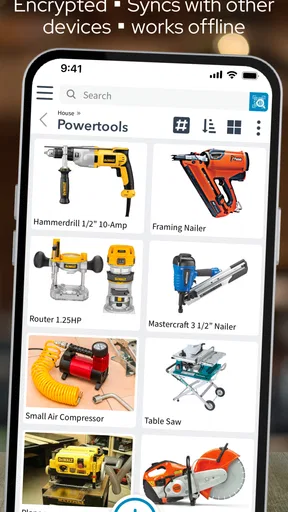

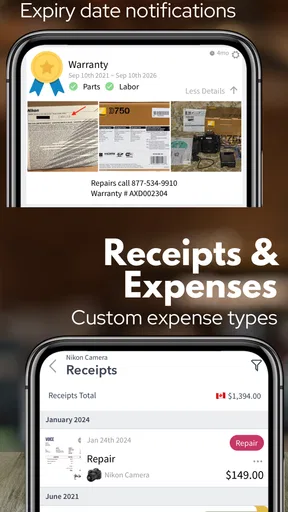
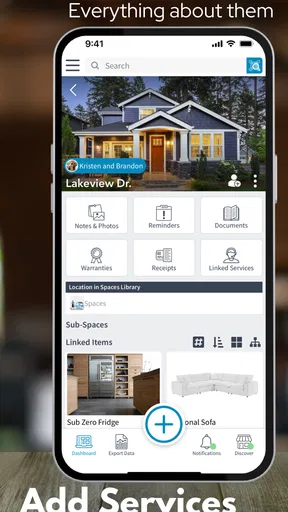
Our Review of Itemtopia Home Inventory
 Analysis by Appyee
I tend to notice the value of a home inventory app at awkward moments: while packing for a move, looking for a receipt, or trying to remember when I last checked an appliance. Itemtopia Home Inventory is built around keeping those details together on a phone. It is a House & Home app from Itemtopia Inc., and its current version is 6.0.18. The app is free to install, with in-app purchases ranging from $3.99 to $39.99 per item, so I’d try the basic workflow before deciding whether any paid option suits the way I plan to use it.
Its current store average is 3.6 from around 740 ratings, and it has passed 50,000 installs. Those figures suggest a real audience, but they aren’t a substitute for deciding whether an inventory system fits your habits. The useful question is less “Can I record my possessions?” and more “Will I keep the records current enough to help me later?” In my view, that is where an app like this earns its place.
Keeping a useful record, not just a list
The first thing I noticed about Itemtopia Home Inventory is how straightforward the setup is. Once you download it from your app store, you're greeted with a clean, user-friendly interface. It’s like the app knew I didn’t have time to mess around with complicated tutorials. Just a few taps, and I was ready to dive into organizing my stuff.
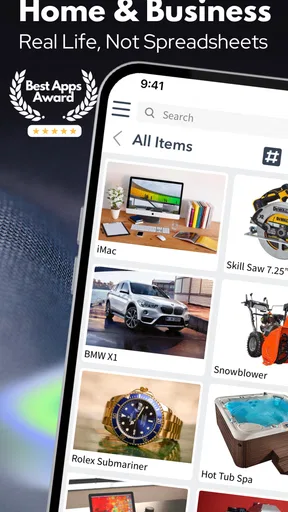
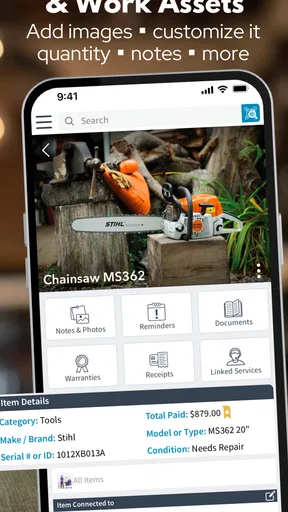
Adding items is a breeze. You can snap a picture of your belongings, jot down some details like the purchase date, price, and even attach receipts. I found this particularly helpful for keeping track of warranties and insurance information. It’s like having a personal assistant who doesn’t talk back!
Features That Stand Out
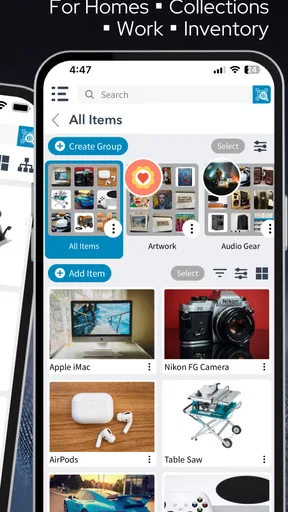
One of the standout features is the ability to create different categories and collections. Whether it’s electronics, furniture, or that massive shoe collection (guilty as charged), Itemtopia lets you sort and organize with ease. For someone who loves categorizing things, this feature was pure gold.
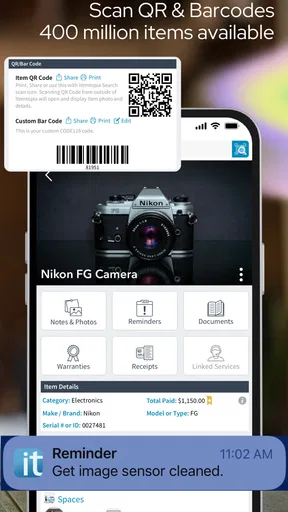
Another handy feature is the maintenance reminders. The app nudges you when it's time to service your car or check your smoke detectors. It’s like having a little voice in your pocket saying, “Hey, don’t forget!” Honestly, who doesn’t need a reminder now and then?
That combination makes the app more practical than a bare list, but it also calls for a little restraint. I would start with the items whose details are costly or annoying to reconstruct: a laptop, a camera, a major appliance, or something with a warranty. Photograph the item and its receipt, then record the details I’m likely to need, rather than trying to document every spoon in the kitchen. A smaller, accurate inventory is more useful than a huge one that quickly becomes stale.
Sharing is Caring
Itemtopia also allows you to share your inventory with others. This is perfect for families or roommates who need to keep track of shared items. Just send them an invitation, and they can view or edit the inventory. It’s teamwork made simple.
Shared access has a practical payoff when ownership and responsibility are spread across a household. For example, roommates could record which person bought a shared appliance and keep its receipt alongside the item, while family members could check the same record instead of texting one another to ask where a document went. I’d agree on a simple convention first—such as who enters purchases and how to name rooms or collections—because inconsistent labels can make a shared inventory harder to search than a private one.
I’d also treat editing access as a decision, not just a convenience. Someone who only needs to consult records may not need the same role as the person maintaining them. The app’s sharing can reduce duplicated work, but it works best when everyone understands what belongs in the inventory and who is responsible for keeping entries accurate.
Security and Peace of Mind
Now, I know what you’re thinking: “Is my information safe?” Itemtopia takes security seriously. Your data is encrypted and stored securely, giving you peace of mind. Plus, there’s cloud backup, so you won’t lose your inventory if you switch devices or have a tech mishap.
Even with a backed-up inventory, I wouldn’t make the app my only copy of especially important paperwork. Keeping original receipts where they are easy to retrieve, and maintaining a separate record of essential insurance contacts, gives you another route if you cannot access your phone or account. For a large collection, I’d also periodically check a few entries and attachments rather than assume every record is complete simply because it was entered once.
Room for Improvement
While I’m singing praises, there are a couple of areas where I think the app could improve. For one, the app doesn’t have a barcode scanning feature, which would make adding items even quicker. Also, while the design is clean, a bit more customization in themes would be a nice touch.
The lack of barcode scanning matters most if you’re cataloguing many similar packaged products or building an inventory in one long session. For household valuables, a photograph and a few deliberate notes may be more useful than a barcode anyway: they identify the particular item and preserve context. I’d avoid starting with a whole home at once. Pick one room, or one category such as electronics, and see whether the time spent entering records feels worth the convenience of finding them later.
The app’s age rating is Everyone, and it was released on January 9, 2015; the current version number shows that it has continued to receive version changes since its early release. That history is useful context, but I wouldn’t infer a particular new feature or improvement from the version number alone. For people already using it, the sensible approach is to review the current app on their device and make sure their inventory habits still match the way they use it.
Where it fits—and where it doesn’t
Compared with a notes app or a spreadsheet, Itemtopia gives item records a more purpose-built home: photos, purchase details, receipts, categories, reminders, and shared access belong together rather than being scattered across documents. A spreadsheet can still be the better choice for someone who wants precise columns, custom calculations, or a compact exportable record. A notes app may be quicker for a handful of belongings. The trade-off is that those simpler tools usually ask you to create and maintain the structure yourself.
I’d choose Itemtopia for a household that wants to find an item’s details later, especially when more than one person needs access or when maintenance reminders are useful. I’d skip it if I only want a quick checklist, dislike entering information by hand, or expect automatic cataloguing to do the work. It is also not a replacement for professional insurance advice or a complete claims process; it can help organize records, but the usefulness of those records depends on what I choose to document and keep current.
For a realistic test, imagine a washing machine starts making an unfamiliar noise. If I had recorded its purchase details, attached the receipt, and set a maintenance reminder, I could check the record before searching through a drawer or asking another household member when it was bought. That is a modest benefit, but it is precisely the sort of small moment in which an inventory app can save time. The same workflow can help when preparing for a move: document valuable items room by room, then use the records as a checklist while packing and unpacking.
One useful trade-off is deciding how much detail each entry deserves. A valuable camera might merit a clear photo, receipt, purchase information, and notes that distinguish it from other equipment. A low-cost household item may need only a name and location, or no entry at all. That keeps the inventory manageable and makes it more likely I’ll update the records when something changes. Categories and collections work best when they reflect how I would actually look for things, not an elaborate taxonomy I’m unlikely to maintain.
What I’d want to see next
For an inventory app, the most important improvements would be the ones that reduce the effort of keeping records accurate. Faster ways to add repeated items, more flexible presentation, and clear handling of shared edits would matter more to me than decorative changes. Those are wishes, not claims about what the current version contains. The most useful thing to watch is whether future changes make regular upkeep easier without adding complexity for people who only need a straightforward household record.
Before building a large catalog, I’d test the questions that matter to my own situation: Can I find an entry quickly by the way I naturally describe it? Is the receipt attached to the right item? Can the people I share with understand the categories? Does a reminder arrive in a way I’ll notice? Answering those in a small trial makes it easier to judge whether the app is worth adopting long term, and whether an in-app purchase is relevant to my needs.
Wrapping It Up
All in all, Itemtopia Home Inventory is a fantastic tool for anyone looking to get a handle on their belongings. Whether you’re just trying to declutter or need a comprehensive inventory for insurance purposes, this app has got you covered.
It’s intuitive, feature-rich, and a breeze to use. So, if you’re tired of the chaos and want to bring some order to your life, give Itemtopia a shot. It might just be the organizational boost you’ve been looking for.
Ready to take control of your stuff? You can download Itemtopia from your favorite app store and start organizing like a pro today!
Verdict
Strengths of Itemtopia Home Inventory
- User-friendly interface for easy navigation.
- Comprehensive item categorization features.
- Cloud backup ensures data safety.
- Syncs across multiple devices seamlessly.
- Customizable fields for detailed entries.
Limitations of Itemtopia Home Inventory
- Limited offline functionality.
- No real-time collaboration features.
- Premium features are subscription-based.
- Occasional sync lag with large data sets.
- No integration with smart home devices.
Similar Picks in This Category
View All
Universal TV Remote Control
CodeMatics Media Solutions3.9

AlfredCamera Home Security app
Alfred Systems Inc.4.7

Planner 5D: AI Home Design
Planner 5D4.5

Universal Tv Remote-Cast to TV
One Music Player4.1

Zillow: Homes for Sale & Rent
Zillow Group4.8

99acres Buy/Rent/Sell Property
infoedge.com4.3
Frequently Asked Questions
What is Itemtopia Home Inventory and what does it do?
Itemtopia Home Inventory is an app designed to help users organize and keep track of their personal belongings. It allows users to catalog items, add detailed descriptions, attach receipts, and set reminders for maintenance or warranties. The app is beneficial for insurance purposes and managing personal inventory efficiently.
Is Itemtopia Home Inventory available for both Android and iOS?
Yes, Itemtopia Home Inventory is available on both Android and iOS platforms. You can download it from the Google Play Store for Android devices or the Apple App Store for iOS devices. The app offers a seamless experience across both platforms, ensuring that you can manage your inventory on your preferred device.
How user-friendly is the interface of Itemtopia Home Inventory?
The interface of Itemtopia Home Inventory is designed to be intuitive and user-friendly. It features a clean layout with easy-to-navigate menus to ensure users can quickly add or retrieve information about their items. Even those who are not tech-savvy will find it straightforward to use, making inventory management a hassle-free process.
Does Itemtopia Home Inventory allow for data backup and synchronization?
Yes, Itemtopia Home Inventory supports data backup and synchronization across devices. This feature ensures that your inventory data is safe and accessible from any device. You can log in from multiple devices and have peace of mind knowing your data is stored securely in the cloud.
Are there any costs associated with using Itemtopia Home Inventory?
Itemtopia Home Inventory offers both free and premium versions. The free version includes basic features sufficient for standard inventory needs. However, for advanced features like additional storage, enhanced reporting, and priority support, users may opt for a subscription to the premium version. Pricing details are available within the app.
